Wednesday, November 25, 2015

iptables - Mail server hammering


I've noticed a quick increase on smtp connections coming to my server, investigating it further i figured out that there's a botnet hammering my smtp server. I've tried to stop it by adding a rule at iptables:


-N SMTP-BLOCK
-A SMTP-BLOCK -m limit --limit 1/m --limit-burst 3 -j LOG --log-level notice --log-prefix "iptables
SMTP-BLOCK "
-A SMTP-BLOCK -m recent --name SMTPBLOCK --set -j DROP
-A INPUT -p tcp --dport 25 -m state --state NEW -m recent --name SMTPBLOCK --rcheck --seconds 360 -j SMTP-BLOCK
-A INPUT -p tcp --dport 25 -m state --state NEW -m recent --name SMTP --set
-A INPUT -p tcp --dport 25 -m state --state NEW -m recent --name SMTP --rcheck --seconds 60 --hitcount 3 -j SMTP-BLOCK

-A INPUT -p tcp --dport 25 -m state --state NEW -j ACCEPT


That would avoid them from hammering "too fast", however the problem still, there's like 5 tries per second, it's going insane, i had to incrase the maximum number of childs of sendmail/dovecot. There's too many ips to filter out manually and simply changing the smtp to another port is not practical since i got many other clients on that server.


I'm using sendmail with dovecot, any ideas to have this filtered out more efficiently?


Answer


My inclination would be to make sure you've got backup MX hosts who are on board; then block access to your port 25 from every machine other than your backup MX host(s). Inbound legitimate mail will be delivered to the backup MX host, which will be able to deliver it to you; but inbound mail not destined for your system and coming from a known-good host will go nowhere.


(The "backup MX host" could even be another machine of yours, or even a VPS/cloud machine that you rent by the hour for a few days.)


Don't get into an arms race with a botnet - it can add traffic faster than you can add bandwidth and servers.


It sounds like maybe you've got a lot of clients/domains on one machine, which makes for more work. Sorry.


You might consider moving to a new IP address and/or changing the A record for the host under attack to 127.0.0.1 and finding a new name for the server - there's some reasonable chance the spammers will move on to another victim and leave your new hostname/IP address alone.

windows - Creating laptop's disk drive image


I have bought a new laptop and there is an original HDD which I replaced with the SSD one. I do want to make an image of the original hard drive just in case of any future issues. My problem is that when creating a copy with RAW processing option the time needed to complete the whole task is over 13 hours (and still rising after an hour from starting the operation).


The disk contains such elements:


  • first track obviously, MBR

  • hidden rescue partition

  • hidden utilities partition

  • main OS partition of size close to 470GB


Do I really need to read the last partition sector by sector? Is it enough to just make a copy of the first three partitions? I am also not sure if having the MBR only would be enough to recreate the last one, OS partition size and type?


Please notice that there is no valuable (private) data in the last partition I am interested in. The only need is to be able to recreate the system if I decide to sell the laptop with it's original OS configuration. If I can restore the HDD content and install OS on the last partition using a backup of only first three partitions, it's the answer I am looking for.


As I have quite a few machines to back up every now and then I would like to keep the process fast and the images as small as possible.

Excel requires dates to be typed in American format


In order to type a literal date into an Excel cell, I currently have to do it in the American format (mm/dd/yyyy). This is unacceptable.


How can I have it such that Excel will correctly recognise dates in the standard dd/mm/yyyy format when typing directly into cells?


Note: I am not asking how to use the "cell format" features of Excel. That is easy enough. I want to be able to directly input international dd/mm/yyyy dates into cells and have them register correctly, regardless of formatting.


Answer


Excel follows the Region and Language settings of Windows.


In Windows 10 : Settings > Time & language > Region & language.
You can either take the default values, or you can fine-tune further in Additional date, time, and regional settings (date, time, number settings etc.)


windows - Reporting tool for Performance Monitor


I am looking for an application I can use to consume performance monitor logs and report on them. Is there an application you have good success with to display the metrics you have captured with PerfMon and point out problem areas etc.?


Thank you,


Brett


Answer


I will point you to a reply on StackOverflow, regarding a very similar question.


windows 8.1 - How can a MBR formatted hard drive exceed 1.81 TiB capacity?


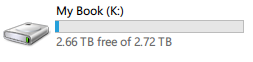
I recently purchased an external disk drive with 3 terabytes (2.72 TiB) of storage capacity.


Now according to Wikipedia's article on MBR, the maximum addressable storage space on a disk formatted using the MBR scheme is restricted to 2TB (1.81 TiB) so it stands to reason that high capacity hard disk drives (>2TB) must be formatted using GUID Partition Table (GPT) scheme to be able to use the entire capacity of the HDD.


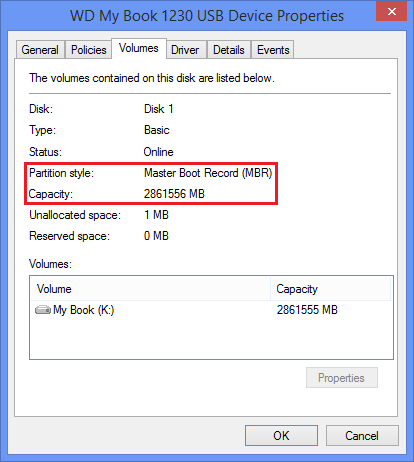
Why is then the 3TB WD My Book external disk drive factory formatted with the MBR scheme and even more surprisingly, why does it show up on Windows as a 2.72 TiB drive when MBR can only address upto 1.81 TiB?


Has anyone else with a high-capacity Western Digital (or other brand) hard drive seen this before?


If it helps, the HDD is formatted using NTFS and the sector size is 4096 bytes. Also, here are a few screenshots:


3 TiB MBR
WD My Book - 3TB


EDIT: After I posted my answer, I read this blog post from AnandTech which says:

Now LBAs under MBR partitions are addressed using 32-bit values, the
maximum of which is 2^32 or 4294967296. Each LBA on a hard drive
corresponds to a 512-byte sector value (even on 4K advance format
drives, they still appear as 512-byte sector drives to the OS
), so the
largest partition you can have in a MBR partitioned drive is
4294967296 * 512-bytes or 2,199,023,255,552 bytes.


Hard drive manufacturers define 1TB as 1 trillion bytes. If we use
that definition then the largest 32-bit MBR partition would be 2.199TB
(2,199,023,255,552 bytes / 1,000,000,000,000). If we define 1TB as
1024^4 bytes (TiB) then the largest 32-bit MBR partition would be 2TiB
(2,199,023,255,552 bytes / 1,099,511,627,776). Either way, with a 3TB
drive there’s no way we’re getting a single 3TB partition using MBR
.


But as you can see, the My Book I own has a single 3TB (2.72 TiB) partition and it's using MBR. The reason why this bothers me is because of this incident where a person claims to have encountered data integrity problems with the drive after transferring more than 2TB of data on the MBR formatted 3TB drive.


Answer


Your USB drive presents itself to the host computer with a logical sector size of 4096 bytes, and that's what enables it to be partitioned with an MBR partition table that can use more than 2 TB of the drive's space, even in Windows XP. MBR partition table entries are 32 bits, which allows a maximum of 2^32 sectors to be used. 2^32 sectors x 4096 bytes/sector = 16 TB. With 512 bytes/sector, only the first 2 TB of a drive could be used by an MBR partition table. (2^32 sectors x 512 bytes/sector = 2 TB)


However, your drive is not 4k native. There are two layers of translation:


  1. The USB enclosure contains a USB-to-SATA bridge that translates from 4096 bytes per logical sector at the USB interface with the host computer to 512 bytes per logical sector at the SATA interface with the drive inside.

  2. The drive inside internally translates from 512 bytes per logical sector on its SATA interface to 4096 bytes per physical sector. (That's 512 byte/sector emulation or "512e".)


A SMART query passed though the USB bridge to the SATA drive inside reveals the truth (run here on my own Western Digital My Book 3 TB external USB drive in Windows XP):


C:\Program Files\GSmartControl> smartctl -a -d sat pd11
smartctl 6.5 2016-05-07 r4318 [i686-w64-mingw32-xp-sp3] (sf-6.5-1)
Copyright (C) 2002-16, Bruce Allen, Christian Franke, www.smartmontools.org
=== START OF INFORMATION SECTION ===
Model Family: Western Digital Green
Device Model: WDC WD30EZRX-00MMMB0
Serial Number: WD-WCAWZ12xxxxx
LU WWN Device Id: 5 0014ee 2063xxxxx
Firmware Version: 80.00A80
User Capacity: 3,000,592,982,016 bytes [3.00 TB]
Sector Sizes: 512 bytes logical, 4096 bytes physical

The internal SATA drive reports 512 bytes per logical sector and 4096 bytes per physical sector: that's 512 byte/sector emulation, or "512e".


However the drive as seen by the host computer connected by USB has a logical sector size of 4096 bytes:


C:\> wmic DISKDRIVE get bytespersector, caption
BytesPerSector Caption
4096 WD My Book 1140 USB Device

and that's how Windows XP is able to use all 3 TB of the drive's space.


If you need more proof than that, you could remove the drive from its enclosure and connect it directly to a motherboard's SATA connector: you'd then find that the drive has a logical sector size of 512 bytes, and the drive's partitions would all appear as 1/8 their previous size and be unreadable due to incorrect partition table entries caused by the sector size mismatch. Plenty of people have done this and then had to fix the problem by rewriting the partition table.


I've checked several different external USB drives and they are all 512e internally despite being configured for Windows XP compatibility with 4096 bytes per logical sector at the USB interface: WD My Book 3 TB, WD Elements 3 TB, HGST Touro 4 TB, WD Easystore 8 TB, WD Easystore 12 TB.


Your drive came with an MBR partition table (or someone changed it to MBR at some point) to make it compatible with Windows XP. Newer drives come with GPT partition tables, which require Windows Vista or later.


The WD Quick Formatter tool can be used to change a Western Digital external USB drive between 512 bytes/sector with a GPT partition table (for Vista and later) and 4096 bytes/sector with an MBR partition table (for Windows XP compatibility).


Tuesday, November 24, 2015

The Windows Search Service has failed to create the new search index


I got this error in Event Viewer


The Windows Search Service has failed to create the new search index.
Internal error <4, 0x8004117f, Failed to add project:
C:\ProgramData\Microsoft\Search\Data\Applications\Windows\Projects>.


EventID: 1006
Level: Error
Task Category: Search service
Source: Search


At the same time, this error also occurs:


The Windows Search Service cannot open the Jet property store.


Details: 0x%08x (0x8004117f - The content index server cannot update
or access information because of a database error. Stop and restart
the search service. If the problem persists, reset and recrawl the
content index. In some cases it may be necessary to delete and

recreate the content index. (HRESULT : 0x8004117f))


EventID: 9000
Level: Error
Task Category: Gatherer
Source: Search


What can I do ?


Answer


I've tested the solution here and it has worked


Basically, you need update the Intel Rapid Storage Technology software to latest version from the intel site


ms excel find and replace @ symbol results in broken formula


I'm trying to search and replace in excel, the column is formatted as 'Text'.


Find: [@


replace with: @


Whenever this finds a match at the start of a cell i.e the cell contents start with [@
and tries to replace that with @ the result is an error 'This function is not valid'


I guess that since the @ operator is for references, this is causing the cell to be interpreted differently (not as text anymore)


How do I make this replacement work?


Copy/paste into another program is not a good option because some of the cells contain line-breaks.


Answer


To my surprise, Excel knows at least 4 different methods to replace a substring.


All of them can handle a leading @ in the way you want it. Except the first method which you are using when opening the search & replace dialog.


The @ is the text placeholder.. If you enter a numeric value like 123 in a cell and set the custom format to @, the cell will be formatted as text (Alignment: right » left).


These examples will all replace the b in cell A1' value abc with 123. Result is always a123c.


1. Range.Replace() (same as CTRL+H dialog)


    [A1].Replace "b", "123", xlPart

Syntax: Range.Replace( What, Replacement, [LookAt], [SearchOrder], [MatchCase], [SearchFormat], [ReplaceFormat] )


2. WorksheetFunction.Replace()


    [A1] = WorksheetFunction.Replace([A1], InStr([A1], "b"), Len("b"), "123")

Syntax: WorksheetFunction.Replace( old_text, start, number_of_chars, new_text )


3. WorksheetFunction.Substitute()


    [A1] = WorksheetFunction.Substitute([A1], "b", "123")

Syntax: WorksheetFunction.Substitute( text, old_text, new_text, [nth_appearance] )


4. Replace()


    [A1] = Replace([A1], "b", "123")

Syntax: Replace( Expression, Find, Replace, [Start, [Count, [Compare]]] )


To answer Loopo's question. You should use the last method since it can handle @ at the beginning of a cell value. I made it a little bit more comfortable with 2 input boxes.


Sub ReplaceFunction()
strFind = InputBox("Find what")
strReplace = InputBox("Replace with")
For Each cell In Selection
cell.Value = Replace(cell.Value, strFind, strReplace)
Next
End Sub

enter image description here


linux - How to SSH to ec2 instance in VPC private subnet via NAT server

I have created a VPC in aws with a public subnet and a private subnet. The private subnet does not have direct access to external network. S...